Book
Basic Course Parameters
Completion requirements
View
This is the first section of your learning. Go through this online booklet to get a first look at your Moodle dashboard.
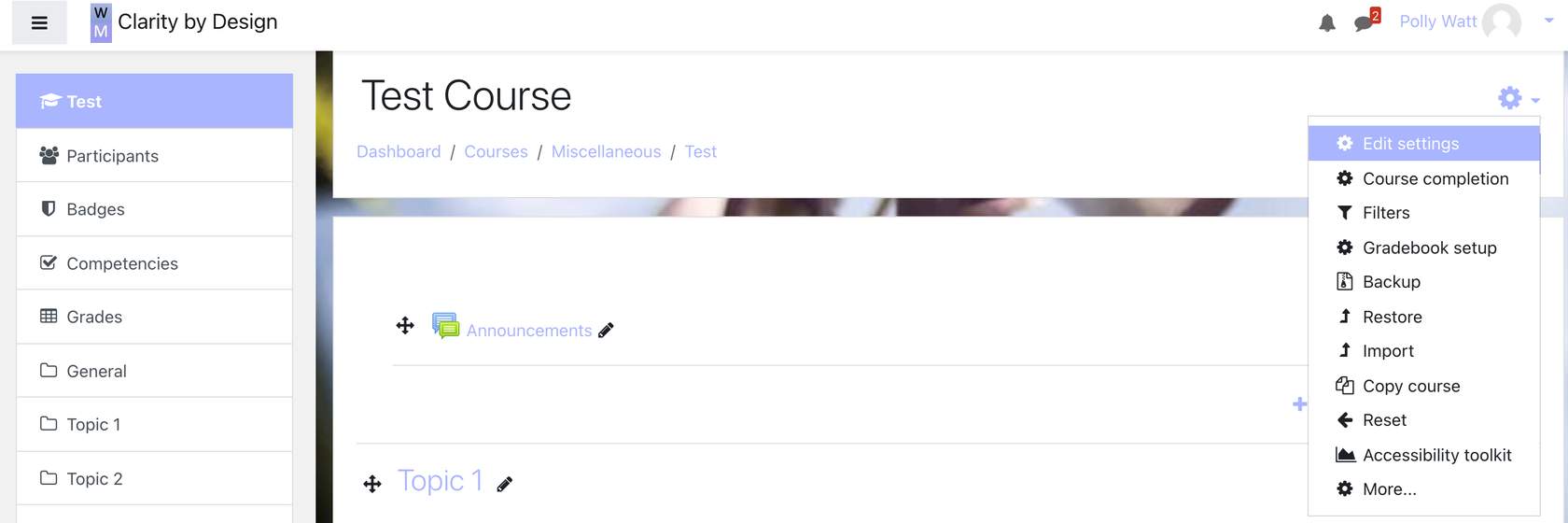
The Settings Cog is one of the most important places on your course page.
- Edit Settings: allows you to set the settings for your course, including the format that you wish to use for the layout of your page (topics, tiles etc)
- Course completion: with this you can bulk edit what elements of your course students must complete to pass the course.
- Filters: display H5P, MathJax, Activity names auto-linking and Multipledia plugins - the default option for these is "on".
- Gradebook setup - this is where you can modify your gradebook settings such as weightings, the order they appear in the gradebook, whether they make up part of the grade etc.
- Backup, restore, import and copy course are all options that allow you to use your content elsewhere, or content from elsewhere in your courses. Moodle files are .mbz