Book
Basic Course Parameters
Completion requirements
View
This is the first section of your learning. Go through this online booklet to get a first look at your Moodle dashboard.
The Login Menu is found on the top right, next to your name. Within in you can find:
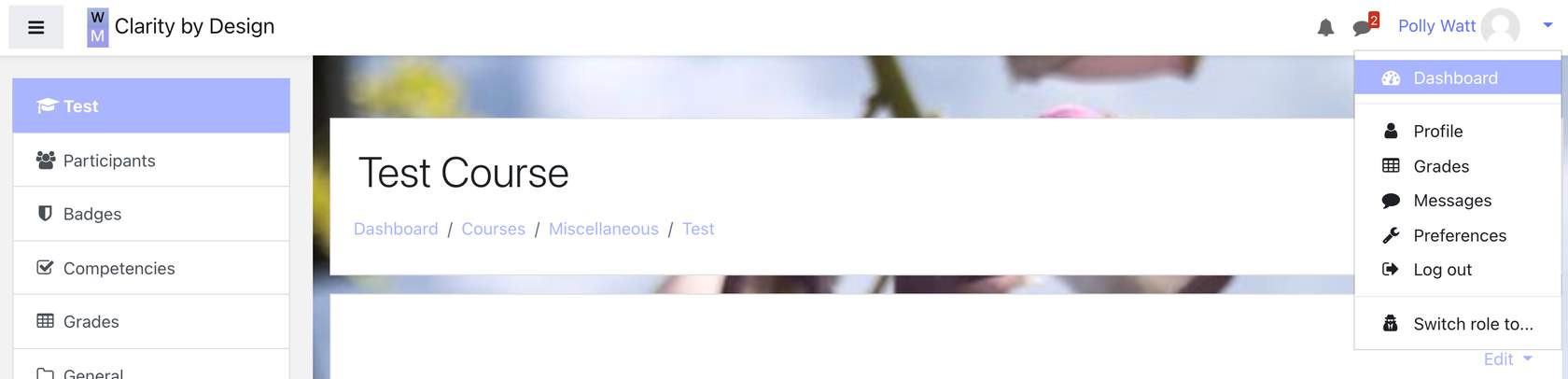
Dashboard: is the equivalent of your homepage
Profile: you can add your photo, set up where you live and fill in details about yourself.
This is where the privacy policy for data retention can be found.
The QR code to login into the mobile app is also to be found here.
The logs showing your user activity can also be found here.
- Grades: for any courses you are taking, or a quick link to the course grades where you are a teacher.
Messages: takes you to any messages you might have sent or received.
Preferences: allows you to change your password, language settings etc
Log Out
Switch Role To: This is a very handy facility, as it lets you see how other roles, such as students, will see the course you are creating.